Samsung Find: Location Sharing
- 3.9
- Rating
- 10.00M
- Installs
- Free
- Price

 Analysis by App-foxy
When a household has several phones, tablets, watches, or other Samsung devices, finding the right one can become surprisingly awkward. Someone leaves a phone in the car, a tablet disappears under a sofa cushion, or a family member wants to let another person know where they are without sending a long explanation. Samsung Find is built for those moments. I used it as a practical location and device-finding tool, and I found that its value comes less from flashy extras than from putting familiar Samsung hardware and trusted contacts in one place.
This is a free lifestyle app from Samsung Electronics Co., Ltd., aimed at everyone rather than a specialist audience. It is available for devices running Android ten or later, and the current version is 1.9.01.11. The app has passed ten million installs and holds an average rating of 3.9 from around four thousand ratings, which suggests a useful but not universally smooth experience. That matches my impression: it can be genuinely helpful in a Samsung-centered home, but it is not a complete replacement for every family-safety or cross-platform location service.
How Samsung Find works in a shared household
When I think about a shared household, the useful question is not simply who can see a location, but what everyone expects that information to help with. I’d agree on a small, practical purpose first—such as meeting up or finding a household device—and keep personal routines separate unless people choose to share them. That gives the household a sensible basis for deciding how to handle unexpected device changes.
You May Also Like

 Blood Strike: 2.5 Anniversary
Blood Strike’s Loadouts Turn Every Drop Into a Tactical Gamble
A close look at Blood Strike’s custom loadouts: how fast access to signature weapons reshapes its battle royale rhythm, rewards preparation, and narrows the gap between fights.

 Pandora - Music & Podcasts
Pandora’s Music Is Easy to Start, but Harder to Recover
Pandora’s strength is its low-effort path from a seed to a station. Its weak spot is how much confidence it asks you to place in connection, setup, and quiet recovery.

 8 Ball Pool
 Is Built on Rivalries, Rematches, and Routine
A close look at the rivalries, rematches, shared routines, and unanswered safety questions that turn a quick pool match into a persistent mobile community.

 Samsung Music
’s Quiet Strength Is Playing What You Already Own
Its reach comes less from spectacle than from dependable access to a personal library. That simplicity is both the app’s strongest retention engine and its ceiling.

 AccuWeather: Weather Radar
AccuWeather Review: A Quick, Clear Forecast for Everyday Decisions
For everyday plans, the best forecast is the one you can understand quickly. AccuWeather makes rain timing, radar, and local conditions easy to act on, with a few trade-offs.

 Hill Climb Racing
Why Hill Climb Racing Still Turns Crashes Into One More Run
A tiny car, a bumpy hill and one more upgrade: Hill Climb Racing keeps resurfacing because its simple chaos makes every near-miss feel personal.
More From Our News Desk
View All News


A realistic day-to-day scenario
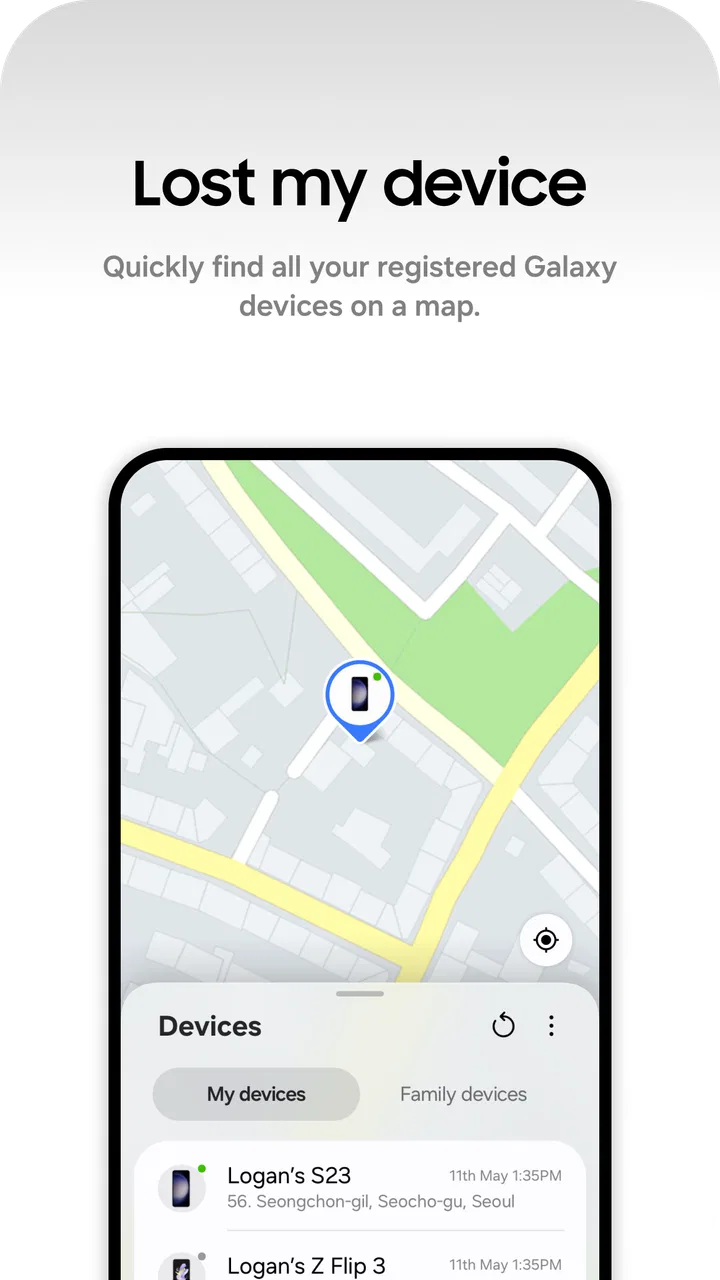
Imagine a household preparing to leave for school, work, or a weekend trip. One person cannot find a Galaxy phone, another wants to check whether a shared device is still nearby, and a parent or partner needs a simple way to share a current location. Instead of opening several unrelated tools, Samsung Find gives these tasks a common starting point. I appreciate that the app treats device discovery and people-based location sharing as connected but separate needs.
That distinction matters. A missing device is an object problem: you want to identify the device and work out where it was last seen or located. A shared location is a coordination problem: you want another person to know where you are. Keeping those uses together makes the app convenient, but it does not mean that every person in a household automatically sees every device or every location. The usefulness depends on which accounts and devices have been deliberately connected.
In my experience, the best use is routine coordination rather than constant monitoring. A household member can share a location when meeting somewhere, while another person can use the device-finding side when a phone or tablet has been misplaced. That makes Samsung Find feel less intrusive than an app designed solely around tracking people. It is a tool you open when there is a practical reason, not necessarily something that needs to stay at the center of family life.
Why Samsung devices make the difference
The app makes the most sense when the people using it already rely on Samsung hardware. A Galaxy phone, tablet, or wearable fits naturally into the same ecosystem, so the app has a clear role beyond simply showing a map. If your household uses a mixture of brands, the experience may be less consistent because the strongest reason to choose Samsung Find is its connection with Samsung devices.
This is also where I would compare it with the usual alternatives. A general map app can be excellent for sharing a live position, but it usually does not feel like a dedicated home for your Samsung devices. A platform-specific device-finding service may be better if everyone uses another brand. Samsung Find sits between those choices: it is more device-aware than a basic location-sharing tool, while remaining more focused than a full family-management platform.
Setting up the right boundaries
The first setup decision should be deciding who actually needs access. I would not add every household member automatically. Instead, I would start with the people who regularly coordinate travel, care for shared equipment, or need to help locate a device. This keeps the app understandable and avoids turning a useful tool into a confusing list of names and hardware.
Account boundaries deserve attention. Each person should understand which account is being used and which devices belong to that account. A shared tablet can easily become confusing if several people treat it as personal property, while a privately owned phone may not belong in a household-wide arrangement at all. I found that a little organization at the beginning prevents mistaken assumptions later.
I also recommend naming or identifying devices in a way that makes sense to the household. If several phones look alike in a device list, “phone” is not enough to tell them apart. A clear description such as a person’s everyday device or a room’s shared tablet makes a real difference when everyone is in a hurry. This is a small workflow improvement, but it is one of the most useful practical habits for a multi-device home.
Before relying on the app during an emergency or a rushed departure, each person should open it once and understand what appears on their screen. A person who has never checked the device list may not know which item to select, while someone unfamiliar with location sharing may assume that a request works automatically. A short practice session is more valuable than discovering these details when a phone is already missing.
Using location sharing without creating confusion
Location sharing works best when the purpose and duration are clear in everyday conversation. For example, I might share my location while travelling to meet someone, then stop treating that shared view as a permanent household arrangement. The app can support coordination, but the people involved still need to agree on what the shared location means and when it is useful.
This is especially important because a map can create false confidence. A displayed position is not the same as proof that a person is available, has arrived, or is safe. If someone is late, I would use the shared location as one clue and still communicate directly. Samsung Find helps reduce unnecessary messages, but it should not replace ordinary check-ins when the situation matters.
For shared devices, I would use the app as an inventory habit as much as a recovery tool. Knowing which tablet belongs to whom, which phone is used for travel, and which device is normally left at home makes an unexpected location easier to interpret. Without that context, a list of devices can be technically accurate but practically unhelpful.
Age, trust, and household expectations
The Everyone content rating makes the app approachable for a broad audience, but age suitability is not the same as family agreement. Younger household members may need help understanding location sharing, account access, and the difference between finding a device and watching a person. I would explain those distinctions before adding anyone to a shared arrangement.
Trust should be mutual. A parent may want to coordinate with a child, partners may want to find one another during travel, and housemates may only need help with shared equipment. Those are different relationships, and the same setup should not be imposed on all of them. Samsung Find is most comfortable when everyone knows what is being shared and why.
I would also avoid presenting the app as a substitute for supervision or care. It can help locate a device or coordinate a meeting, but it does not turn a phone into a complete safety system. That is an important limitation for families looking for extensive controls, alerts, or detailed wellbeing tools. In those cases, a dedicated family service may be a better match, provided it fits the household’s privacy expectations.
What I found useful beyond the basic description
One non-obvious strength is that device recovery and people coordination can be considered together. When a household member says, “I cannot find my phone,” the first question is often whether the person or the device is missing from the expected place. Having both kinds of information associated with a familiar Samsung environment can shorten that conversation, even though the app does not remove the need for sensible communication.
A second useful insight is that the app can reduce ownership confusion in homes with several Samsung products. I would use it during a household inventory, checking that each important device has an obvious owner or purpose. This is particularly handy after travel, when devices are charged in different rooms or placed in different bags. The benefit is not a special feature so much as a clearer mental model of the equipment already in the home.
A third trade-off is the balance between convenience and account separation. Bringing devices and people into one shared workflow is convenient, but it can tempt users to blur personal and shared access. I think the safest approach is selective sharing: include only what the household genuinely needs, keep personal devices personally understood, and review the arrangement whenever ownership changes.
A fourth practical tip is to test the workflow after a major change. If someone replaces a phone, gives a tablet to another family member, or stops using a Samsung device, the household should revisit its list and sharing habits. Otherwise, an old entry can make the app appear less reliable than it really is. This is a general maintenance task, but it matters more in a shared environment than when one person uses the app alone.
Where the experience can feel limited
The average rating of 3.9 reflects the fact that convenience does not guarantee a perfect experience for everyone. The app’s usefulness depends heavily on having compatible Samsung devices and on people understanding their account relationships. If your main goal is simply to send a location to friends who use different phones, a familiar cross-platform map service may feel easier.
I also would not choose Samsung Find solely because it is free. Free removes a purchase barrier, but it does not remove setup work or privacy decisions. A household still needs to decide who participates, which devices matter, and how location sharing fits into its normal communication. Users who expect the app to solve every lost-device or family-coordination problem automatically may be disappointed.
Another limitation is conceptual rather than technical: the app can show useful information, but it cannot interpret the situation for you. A device in an unusual place might have been left there intentionally. A person’s location might be old or misunderstood. The app is strongest when the user combines it with knowledge of the household and direct conversation.
Who should use it and who should look elsewhere
I recommend Samsung Find to households that already use Samsung phones, tablets, or related devices and want one familiar place for device discovery and location coordination. It is particularly suitable for people who often misplace hardware, travel together, or need a straightforward way to share where they are without adopting a complicated system.
I would be more cautious about recommending it to a mixed-device household where only one person uses Samsung hardware. In that situation, a platform-neutral location service may create fewer account and compatibility questions. I would also point families toward a dedicated safety or parental-control product if they need extensive supervision features rather than basic coordination and device finding.
For an individual Samsung owner, the app can still be worthwhile, especially if losing a phone or tablet would cause serious disruption. However, its strongest advantage appears when several trusted people and Samsung devices are organized around the same practical routine. That is when the app becomes more than another icon in a phone’s app drawer.
My household verdict
After using Samsung Find as a lifestyle utility, I see it as a sensible choice for Samsung-centered homes that want less friction when locating devices or coordinating with trusted people. It is free, accessible to all ages, and broad enough to cover both hardware and location-sharing situations without forcing those uses into the same conversation.
My recommendation comes with a clear condition: set it up intentionally. Decide who should participate, keep account boundaries understandable, identify shared devices clearly, and explain location-sharing expectations before relying on it. Those habits make a bigger difference than simply installing the app.
Samsung Find is at its best as a calm household coordination tool, not as a replacement for trust, communication, or a full family-safety service. If your home is built around Samsung devices, I think it is worth trying. If your household is mostly cross-platform or expects advanced supervision, the usual alternatives may fit better.
The app is free and carries an Everyone rating, so there is little barrier to testing it with a small, clearly defined group. I would begin with one shared device and one simple location-sharing situation, then expand only if the arrangement genuinely helps. That approach keeps the experience practical and makes it easier to decide whether Samsung Find belongs in your household’s everyday toolkit.
FAQs for Samsung Find: Location Sharing
01What is Samsung Find: Location Sharing and how does it work?
Samsung Find: Location Sharing is an app designed to help users share their real-time location with friends and family. It utilizes GPS technology to provide accurate location details. Users can send their location to selected contacts, ensuring they know where you are at any given time. The app is particularly useful for coordinating meetups or ensuring safety.
02Is my location data secure when using Samsung Find: Location Sharing?
Yes, Samsung Find: Location Sharing prioritizes user privacy and data security. The app uses encrypted channels to transmit location data, ensuring that only designated contacts can view your location. Users have full control over who can see their location and can stop sharing at any time to enhance privacy.
03Can I use Samsung Find: Location Sharing on any smartphone?
Samsung Find: Location Sharing is optimized for Samsung devices and may not be available on all smartphones. However, it is compatible with most Android devices running the latest operating systems. For optimal performance and access to all features, it is recommended to use a Samsung Galaxy device.
04Does Samsung Find: Location Sharing drain my phone's battery quickly?
While any GPS-based app can affect battery life, Samsung Find: Location Sharing is designed to minimize battery usage. It efficiently manages GPS and data processes to reduce impact. Users can further conserve battery by adjusting location update intervals or using the app only when necessary.
05How can I manage my contacts within Samsung Find: Location Sharing?
Managing contacts in Samsung Find: Location Sharing is straightforward. Users can add or remove contacts directly within the app. You can grant or revoke access to your location at any time, ensuring you share your location only with people you trust. The app also allows for easy customization of sharing settings for different contacts.
Pros
- User-friendly interface for easy navigation.
- Real-time location updates enhance safety.
- Low battery consumption during use.
- Supports group location sharing efficiently.
- Customizable privacy settings for peace of mind.
Cons
- Requires constant internet connection.
- Limited features on the free version.
- Occasional GPS accuracy issues reported.
- In-app ads can be intrusive at times.
- Privacy concerns with data sharing policies.

Samsung Find: Location Sharing
Gallery